Case Study: The Hidden Phone Number Problem (And the Automation That Fixes It)
Your subscriber just texted "BOOK" to your short code. Thirty seconds later, they're on your landing page filling out a form. But here's the gap nobody talks about: that form asks for name, email, and zip code. Not phone number. Because every field you add kills conversion rates.

Your subscriber just texted "BOOK" to your short code. Thirty seconds later, they're on your landing page filling out a form. But here's the gap nobody talks about: that form asks for name, email, and zip code. Not phone number. Because every field you add kills conversion rates.
So now you've got two disconnected records. A phone number sitting in your texting platform. A form submission sitting in your CRM. And no clean way to connect them.
I've watched ministry partners struggle with this exact problem for years. They're running SMS campaigns through Powered by Text, driving traffic to landing pages, and losing valuable subscriber data in the handoff. The phone number that started the whole interaction—the most direct line to that person—gets orphaned.
The solution isn't asking for the phone number twice. It's building a bridge between the text message and the form submission using a single tracking parameter.
Why This Problem Matters More Than You Think
Forms with fewer fields convert better. That's not opinion—it's documented in dozens of A/B tests across industries. Removing even one field can boost completion rates by 5-10%. Phone number fields are particularly friction-heavy. People hesitate. They worry about spam calls. They abandon.
But phone numbers aren't just nice to have. For organizations running SMS campaigns, the phone number is the primary relationship. It's how you reached them in the first place. Losing that connection means:
- Incomplete contact records that fragment your audience
- Duplicate entries when the same person shows up through different channels
- Wasted list-building effort when you can't tie actions back to subscribers
- Manual reconciliation work that never quite catches everything
The traditional fix—making phone number required on the form—trades form conversion for data completeness. That's a bad trade. What you need is a system that captures the phone automatically, without the subscriber doing anything extra.
The UTM Bridge: How It Actually Works
Here's the core insight: when someone texts your keyword, you already have their phone number. Powered by Text sends it to you in the webhook. The challenge is carrying that phone number forward to the eventual form submission without asking for it again.
The solution uses a custom UTM parameter—let's call it utm_pbt—as a unique tracking ID that connects the two events.
Your phone number and your form submission don't need to happen at the same time. They just need to share a common identifier.
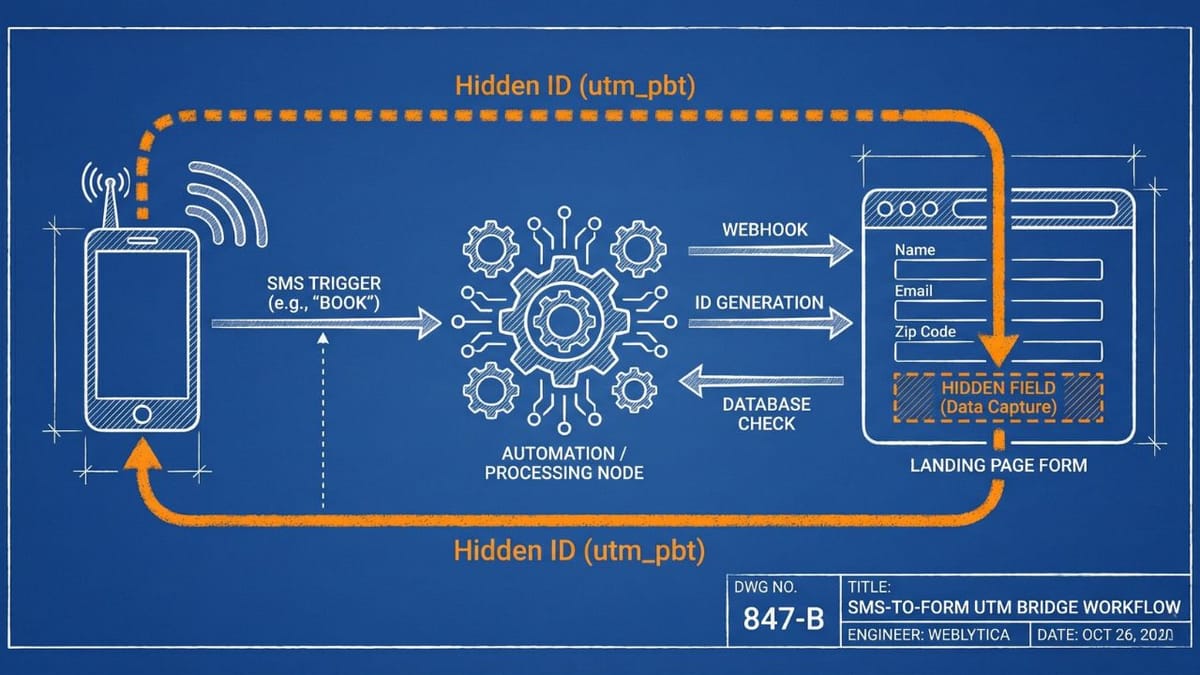
When someone texts your keyword, the automation creates or retrieves a unique ID for that phone number. That ID gets embedded in the personalized link sent back to the subscriber. When they click through and submit the form, the form captures that same ID from the URL in a hidden field. Now you can look up the phone number using the ID and merge everything into a single, complete record.
No duplicate data entry. No extra form fields. No manual matching later.
The Six-Step Workflow
Let me walk you through how this actually flows in Make.com (or your automation platform of choice). This isn't theoretical—I've built this exact system for ministry partners using Knack as the database and Powered by Text for SMS.
Step 1: Catch the Incoming Text
The subscriber texts a keyword—"BOOK" or "GUIDE" or whatever you've set up—to your short code. Powered by Text fires a callback webhook containing:
- The subscriber's phone number
- The message they sent (the keyword)
- Group and division identifiers from PBT's system
This webhook triggers your automation. You've now got the phone number—that's the easy part. The work is in what happens next.
Step 2: Look Up the Campaign
The keyword tells you which campaign this subscriber is responding to. Search your database for that keyword to retrieve:
- The campaign name
- The destination landing page URL
- Any partner or ministry information for attribution
This lookup also catches bad keywords. If someone texts something you don't recognize, you can send a helpful response instead of a broken link.
Step 3: Check for Existing Records
Before creating anything new, check if this subscriber already exists in your system. Search two places:
- Your main Contacts table—by phone number AND by any existing
utm_pbtvalues - Your Mobile Staging table—by phone number alone
This step matters for returning subscribers. If someone already went through this flow last month, you don't want to create duplicate records. You want to reuse their existing tracking ID so all their interactions stay connected.
Step 4: Route Based on What You Found
Here's where the logic branches:
| What You Found | What You Do |
|---|---|
| No existing records anywhere | Create a new Mobile Staging record. The auto-increment ID becomes your utm_pbt |
| Existing staging record (no contact yet) | Retrieve that existing utm_pbt |
Existing contact with utm_pbt |
Retrieve their utm_pbt from the contact record |
The staging table acts as a temporary holding area. It stores the phone-to-ID mapping until the form submission completes the record.
Step 5: Generate the Personalized Link
Now you've got your unique tracking ID. Time to build the URL. Authenticate with Powered by Text's API and create a short URL that includes:
{Landing Page URL}?utm_source=BRN&utm_medium=PBT&utm_campaign={Campaign Name}&utm_pbt={Unique ID}
The standard UTM parameters (utm_source, utm_medium, utm_campaign) maintain your campaign attribution. The custom utm_pbt parameter is your bridge to the phone number.
PBT's short URL feature is essential here—nobody wants to click a 200-character link in a text message.
Step 6: Send the Response
Text back to the subscriber with their personalized link. The message typically looks something like:
"Thanks! Here's your link to [Resource Name]: [Short URL]"
That short URL carries the tracking ID. When they click it, the landing page receives all those UTM parameters. When they submit the form, the form captures them.
Completing the Connection
The automation above handles the SMS side. But the bridge only works if the form submission side knows what to do with that utm_pbt parameter.
Your form needs to capture UTM parameters from the URL. Most form builders support this—check your platform's documentation for "hidden fields" or "URL parameter capture." Configure a hidden field to grab utm_pbt and include it in the submission data.
The magic happens in the post-submission automation. Look up the staging record by utm_pbt. Merge the phone number with the name, email, and zip from the form. Create the complete contact record.At this point, you have everything:
- Name, email, and zip code from the form submission
- Phone number from the original text message
- Full campaign attribution from the UTM parameters
- A single, unified contact record
No manual data entry. No duplicate records. No asking the subscriber for information you already have.
The Technical Components
If you're building this yourself, here's what you need:
Database (I use Knack, but any relational database works):
- Campaigns table: keyword, name, landing page URL, partner info
- Mobile Staging table: phone number,
utm_pbt(auto-increment ID), creation date - Contacts table: the final destination for complete records
SMS Platform:
- Powered by Text or similar short code service
- Webhook capability on incoming messages
- API access for creating short URLs
Automation Platform:
- Make.com, Zapier, or n8n to orchestrate the workflow
- Webhook triggers for both the incoming text and form submission
- HTTP modules for API calls to your SMS platform
Landing Page and Form:
- Hidden field capability to capture URL parameters
- Webhook or integration to trigger post-submission automation
Why This Approach Works Better Than Alternatives
I've seen teams try other approaches to this problem. They all have drawbacks.
Making phone required on the form: Kills conversion. Subscribers may also enter a different number than the one they texted from, creating mismatches.
Manual matching after the fact: Time-consuming, error-prone, and always incomplete. Especially painful at scale.
Asking subscribers to confirm their number via text after form submission: Adds friction, requires multiple steps, and depends on the subscriber actually completing the confirmation.
Using cookies or device fingerprinting: Privacy-invasive, increasingly unreliable with browser restrictions, and doesn't work across devices.
The UTM bridge approach respects privacy while maintaining data integrity. The phone number only gets connected to the form submission when the subscriber actively clicks your link and completes your form.
There's something elegant about this too. The subscriber initiated contact via SMS—they opted in with their phone number by texting your keyword. The tracking ID simply ensures that choice carries forward to whatever action they take next.
Edge Cases to Handle
Real-world implementations always surface edge cases. Here are the ones I've encountered:
Subscriber texts multiple keywords over time: The staging table lookup should match by phone number. Returning subscribers reuse their existing utm_pbt, keeping all interactions connected.
Subscriber clicks the link but doesn't submit the form immediately: As long as the URL parameters persist (most browsers preserve them), they can return and complete the form later. You might set staging records to expire after 30-60 days if you want to enforce freshness.
Same person, different phone number: This happens when someone texts from a work phone but fills out the form on their personal device (different browser, no URL parameters). No perfect solution here—the bridge only works when there's continuity from text to form.
Invalid or test keywords: Your campaign lookup should handle this gracefully. Send a friendly "we didn't recognize that keyword" response rather than a broken link.
Getting Started
If you're running SMS campaigns that drive to web forms, this pattern is worth implementing. Start simple:
- Add a staging table to your database with phone number and auto-increment ID fields
- Configure your first webhook to catch incoming texts
- Build the lookup-and-route logic for a single campaign
- Update your form to capture the
utm_pbtparameter - Build the form submission automation that looks up and merges
Once the pattern is working for one campaign, extending it to others is mostly copy-paste with different keywords and landing pages.
The upfront build takes a few hours. After that, every SMS campaign automatically bridges phone numbers to form submissions without any additional work.
Key Takeaways
- Form friction kills conversion. Don't ask for information you already have.
- Custom UTM parameters can carry data forward through user journeys.
- A staging table bridges the gap between initial contact and completed action.
- Returning subscribers should reuse existing tracking IDs to maintain unified records.
- The phone number connection only happens when the subscriber completes the action—respecting their choice while maximizing data quality.
Frequently Asked Questions
Does this work with platforms other than Powered by Text?
Yes. Any SMS platform that provides webhook callbacks with the subscriber's phone number can work. The specific API calls for creating short URLs will differ, but the pattern remains the same.
What if someone shares the link with a friend?
The friend would submit the form with the original subscriber's tracking ID. Your form submission automation could detect this (different IP, different device fingerprint) and flag it for review—or simply accept it, since the friend is still a valid lead even without a connected phone number.
How long should staging records persist?
Depends on your campaign timing. For event-based campaigns with short windows, 7-14 days might suffice. For evergreen resources, 30-60 days is reasonable. Expired staging records can be archived or deleted during routine database maintenance.
Can this work for email campaigns too?
The concept applies anywhere you have an identifier in one system that needs to connect to a form submission in another. For email, you might use the subscriber's email address as the bridge instead of creating a separate tracking ID—but the pattern of passing data through URL parameters to hidden form fields is identical.
Building automation that connects disconnected systems is what we do at Weblytica. If you're wrestling with data integration challenges in your ministry or nonprofit, visit our website—we've probably solved something similar.