The 4 Gmail Tabs You Check Every Day Are Stealing 100 Hours of Your Year
I’m going to make a confession that might get me kicked out of the productivity guru club: I don’t believe in inbox zero.

Not because it’s impossible — it’s not. I’ve seen people achieve it. I’ve achieved it myself, briefly, in the same way I once completed a 30-day plank challenge. Both experiences taught me the same thing: some victories require more daily maintenance than they’re worth.
But here’s what I do believe in: systems that do the work so you don’t have to.
(This is the part where I admit I’ve spent an unreasonable amount of my professional life thinking about email management. Like, an amount of time that probably says something unflattering about me as a person.)
The Gmail Tab Problem Nobody Talks About
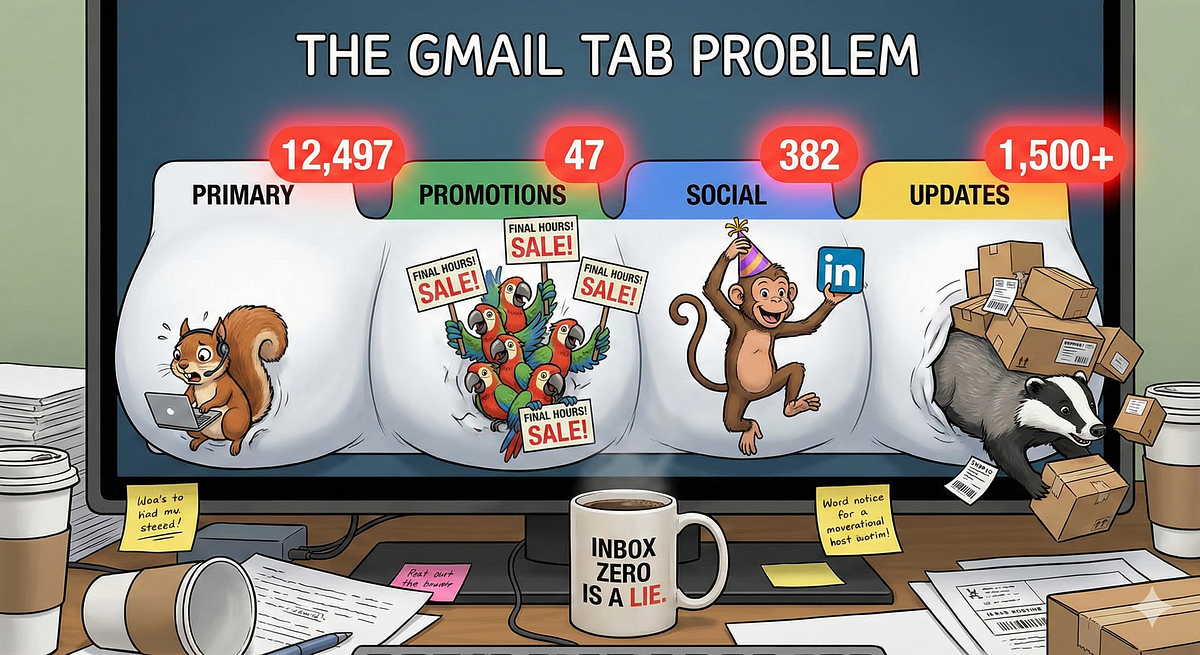
Gmail promised us organization. What they delivered was five separate inboxes wearing a trench coat pretending to be one.
You’ve got Primary — where the real stuff lives. Client emails. Actual conversations. Things that matter.
Then you’ve got the other four: Promotions, Social, Updates, and Forums.
Promotions is where 47 emails are screaming “FINAL HOURS!” at you simultaneously. (None of them are actually final. They never are. It’s the boy who cried clearance sale.)
Social is where LinkedIn keeps congratulating you on the work anniversary of someone you met at a conference in 2019 and spoke to for exactly four minutes.
Updates contains shipping confirmations for packages that arrived three weeks ago, still helpfully informing you that delivery is imminent.
And Forums? I’ve been using Gmail since 2004 and I still have no idea what goes in Forums. It’s the junk drawer of email tabs.
Here’s the thing nobody wants to admit: you check these tabs. Every day. Maybe multiple times.
Not because they contain anything important — if they did, Gmail would’ve put it in Primary. You check them because the little number badge makes you feel like you’re behind on something. Like there’s a to-do list you haven’t finished.
And the only way to make that badge go away is to click, scan, delete, repeat.
The Math That Made Me Angry
I started tracking how long I spent on those four tabs. Just the secondary ones — Promotions, Social, Updates, Forums. Not Primary, which actually requires attention.
The answer was somewhere between 20 and 40 minutes a day.
Let’s be charitable and call it 25 minutes. That’s:
- 2 hours per week
- 8 hours per month
- 100 hours per year
One hundred hours. Spent on emails that Gmail itself has already decided aren’t important enough for your Primary inbox.
For context, that’s enough time to watch the entire Lord of the Rings extended trilogy eight times. Or learn basic conversational Spanish. Or, I don’t know, spend time with your family doing something that isn’t silently scrolling through promotional emails while they talk to you.
(Not that I’ve done that. Definitely not. Moving on.)
This realization led me down a familiar path — the one where I start automating things that normal people just accept as part of life.
The Automation Philosophy Behind the Fix
I’ve spent 700+ hours on one-on-one automation calls with business owners. And one pattern I see constantly is people trying to automate their way out of bad systems.
This isn’t that.
The Gmail tab situation isn’t a bad system you created. It’s a design decision Google made that forces you to do repetitive work. They gave you multiple inboxes and then made you responsible for maintaining all of them.
The automation philosophy here is simple: if a task is repetitive, predictable, and low-judgment, a machine should do it. Checking whether that Banana Republic email is worth your attention? Repetitive. Predictable. Requires zero judgment.
So here’s what I built for myself, and then started building for clients:
An automation that runs once daily and does exactly what you’d do manually — except it takes 30 seconds instead of 25 minutes:
- It scans all four secondary Gmail tabs for new messages from the past 24 hours
- It uses AI to summarize each email into 1–2 sentences (because you don’t need 800 words about a flash sale)
- It extracts those unsubscribe links they bury in 6-point gray font like they’re hiding state secrets
- It compiles everything into one clean daily digest email
- It sends that digest to your Primary inbox
- It archives the originals so your tabs stay empty
Tomorrow morning, instead of four tabs with badge notifications silently judging your productivity, you get one email. Scan it in two minutes. Unsubscribe from the obvious noise with one click. Done.
Why This Works Better Than “Just Ignore Them”
I know what you’re thinking, “Just turn off badge notifications. Problem solved.”
And technically, sure. You could do that. You could also just… never look at those tabs again.
But we both know you won’t. Because what if there’s something important? What if that one shipping notification you ignored was actually the one that needed a response? What if that promotional email has a discount code for something you actually need?
The anxiety doesn’t go away just because you stopped looking. It sits there, quietly, in the background of your brain, taking up space.
The automation doesn’t ask you to ignore anything. It surfaces everything, but in a format that takes 2 minutes instead of 25. You’re not ignoring your inbox — you’re processing it efficiently.
That’s the difference between discipline and systems. Discipline says “just don’t look.” Systems say “here’s a way to look that doesn’t cost you 100 hours a year.”
(This is also why I don’t believe in most productivity advice. It almost always amounts to “just have more willpower.” Which is like telling someone who wants to lose weight to just stop being hungry. Thanks, very helpful.)
The Unsubscribe Button Problem
One of my favorite features of this automation is the unsubscribe link extraction.
You know how every promotional email has an unsubscribe link? And you know how it’s always in tiny gray text at the very bottom, sometimes requiring you to scroll past an entire novel’s worth of footer content?
That’s not an accident. They don’t want you to unsubscribe. So they make it annoying enough that most people won’t bother.
The automation finds those links and surfaces them right next to the sender’s name in your daily digest. One click. Done.
I’ve watched clients unsubscribe from 15–20 email lists in a single sitting, just because the friction was finally removed. Their daily digest gets shorter every week. Eventually, it becomes genuinely useful — a quick scan of things that are actually worth knowing about.
That’s the other automation philosophy at work: reduce friction for the behaviors you want, increase friction for the behaviors you don’t. Google increased friction for unsubscribing. This automation removes it.
What This Actually Looks Like
I realize I’ve been talking in abstractions, so let me get concrete.
Here’s what your morning looks like before this automation:
- Open Gmail
- See Primary has 3 new emails (actual work)
- See Promotions has 47 new emails (tiny number badge glaring at you)
- See Social has 12 new emails
- See Updates has 8 new emails
- See Forums has 3 new emails (still no idea what Forums is)
- Click Promotions, scan, delete obvious junk, archive a few “maybe later” things
- Click Social, scroll, wonder why you’re still getting LinkedIn notifications
- Click Updates, confirm that yes, your package did arrive three weeks ago
- Click Forums, stare blankly, archive everything
- Return to Primary, finally start actual work
- Repeat tomorrow
Here’s what your morning looks like after:
- Open Gmail
- See Primary has 4 new emails (3 actual work + 1 daily digest)
- Open digest, scan 2–3 sentences per email, unsubscribe from anything annoying
- Archive digest
- Start actual work
- Never think about the other four tabs again
The other tabs still exist. They’re just… empty. Forever. Like that junk drawer you finally cleaned out and now refuse to let anyone use.
The Part Where I Mention I Do This For People
If you’ve read this far, you’re probably either (a) deeply concerned about my email-related priorities in life, or (b) wondering how to actually set this up.
For option (b): I build this automation for people.
It’s a 90-minute live Zoom call where I screen-share and build the entire thing while you watch. You see exactly how it works, what every piece does, and how to troubleshoot if something ever breaks.
The cost is $249 once, plus about $10/month for the automation platform that runs it. No monthly fees to me. No retainer. No “premium support tier.” You own the automation. Forever.
I’ve done 700+ hours of one-on-one automation calls. This particular build is one of my favorites because the ROI is so obvious. You’re trading 90 minutes of your time for 100+ hours per year back.
If your time is worth more than $2.49/hour, the math works.
(That’s the only pitch. I’m not going to tell you this is “the most important productivity investment you’ll ever make” or that you need to “act now before this limited-time offer expires.” It’s just a useful automation that saves time. If that sounds good, great. If not, also great. I hope the email philosophy was at least mildly entertaining.)
The Bigger Point
We treat email overwhelm like it’s a personal failure. Like if we were just more disciplined, more organized, more productive, we wouldn’t feel buried.
But the system itself is designed to bury you. Every company you’ve ever given your email address to has an incentive to stay in your inbox. They hire entire teams to write subject lines that make you click. They A/B test the placement of unsubscribe links to make sure you won’t find them.
You’re not losing because you’re bad at email. You’re losing because you’re playing against a system optimized for your attention.
The solution isn’t more willpower. It’s a better system.
Automation isn’t about eliminating humans from work. It’s about eliminating the work that makes humans miserable. And I don’t know about you, but manually sorting through promotional emails makes me genuinely miserable.
One hundred hours a year is a lot of life. What would you do with an extra hundred hours?
Probably not watch Lord of the Rings eight times. But maybe something better.
Andy O’Neil helps business owners build AI systems that don’t make them want to throw their laptop into traffic. He’s conducted 700+ co-building sessions and still thinks webhooks are basically magic. Connect with him on LinkedIn if you want more of…this. Whatever this is.